
PUNOVIX Blog
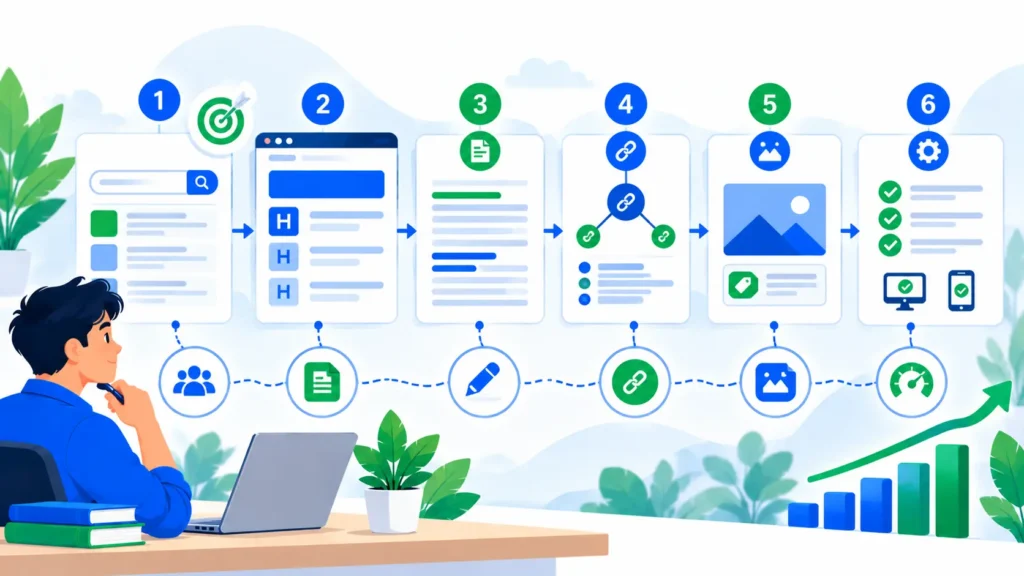
On-page SEO helps search engines understand what a page is about and helps visitors find, read, and use the information they came for. It includes elements you can improve directly on a page, such as the title, headings, text, URLs, links, images, and some HTML details. For a beginner, the goal is not to turn every page into a technical project. It is to make each page clear, useful, accessible, and easy to navigate.
This guide explains on page SEO for beginners through a practical checklist you can use before publishing or updating a page. You will learn how to match search intent, write clear titles, organize headings, improve content, add useful links, describe images, and review basic technical settings. These steps can help search engines interpret a page, but they do not guarantee a particular ranking. Quality, relevance, competition, and many other factors also matter.
What Is On-Page SEO?
On-page SEO is the process of improving the content and page-level elements of an individual URL. It is different from off-page SEO, which includes signals outside your site, and technical SEO, which covers broader crawlability, indexing, and site infrastructure. The areas can overlap, but the distinction helps you diagnose problems more logically.
For example, if an article is about choosing a business email platform, the title should describe that subject, the introduction should address the reader’s decision, headings should cover meaningful comparison criteria, and links should lead to useful supporting information. The page should also load correctly and be accessible to visitors on common devices.
A useful on page SEO checklist is a reminder to review these elements consistently, not a formula that guarantees rankings. Search engines can understand language variations, so repeating an exact keyword in every heading is unnecessary. Focus on clarity, relevance, and whether the page satisfies the intended reader.
Why On-Page SEO Matters
It clarifies a page’s purpose
A descriptive title, logical headings, and focused content make it easier for readers to tell whether the page answers their question. They also help search engines interpret the main subject and supporting details.
It improves the reading experience
Short, meaningful paragraphs, clear sections, useful images, and descriptive links help visitors scan and understand information. Good organization is especially important on mobile screens.
It connects related resources
Relevant internal links help readers move from one useful page to another. External links can support a claim or point to an official reference when the destination adds value.
It helps you publish consistently
A reusable checklist reduces avoidable omissions. Instead of relying on memory, you can review important elements each time you publish or update a post. These on page SEO techniques are most useful when they support a better page for real users.
Step 1: Match the Page to Search Intent
Before editing a title or adding keywords, identify what the searcher wants to accomplish. Someone looking for a definition may need a concise explanation, while someone searching for a checklist likely expects actions they can follow. A product comparison query may require a different format again.
Search for the target phrase and review the kinds of pages that appear. Look for recurring formats, important subtopics, and questions that remain unanswered. Do not copy competitors’ wording or layouts. Use the results to understand the likely expectation, then create your own useful response based on reliable information and examples.
For on page SEO for beginners, start with one primary topic and make sure the page answers it early. Supporting phrases can describe related questions, but they should not push the content away from its main purpose. If the search intent is unclear, record the uncertainty and review it rather than assuming the highest-volume phrase is always best. Another useful step in on page SEO for beginners is to note the reader’s likely next question and make sure the page addresses it or links to a relevant resource.
Step 2: Write a Clear SEO Title and Meta Description
The SEO title should describe the page accurately and give readers a reason to choose it. Keep it specific, avoid exaggerated promises, and make sure it matches the visible page heading. Google may generate a different title link based on page content and other signals, so a title tag is not an absolute guarantee of what will appear in search results.
A meta description is a concise summary of the page. It may be used as the search snippet, although Google can also select text from the page itself. Explain what the reader will learn and avoid vague claims or a long list of repeated keywords.
Before publishing, check that the SEO title and description are unique, relevant, and consistent with the content. If you use an SEO plugin, treat its character or pixel indicators as practical previews rather than rigid ranking rules. A title that is technically short but unclear is not an improvement.
Step 3: Use a Short, Descriptive URL
A page URL should be readable and give a useful hint about the topic. Prefer meaningful words separated by hyphens; avoid random IDs or unnecessary parameters in the public permalink when you can control it.
For example, on-page-seo-for-beginners is a clearer slug for a beginner guide than a string of unrelated numbers. Keep the URL stable once a page is published. Changing an established slug can break links or lose signals if the old URL is not redirected properly. Only change an existing URL when there is a good reason, and set up an appropriate permanent redirect.
URLs are one part of on-page organization, not a place to repeat every supporting phrase. Choose a slug that identifies the page, then move on to the content and user experience.
Step 4: Organize the Page with Helpful Headings
Use one clear main heading for the article title, then structure major sections with H2 headings and relevant subsections with H3 headings. Headings should describe the material that follows and help people scan the article. Do not use heading tags just to make text larger; styling should be handled separately from document structure.
Keep sections focused. If a heading promises a checklist, include an actionable checklist. If it introduces a comparison, explain the criteria and the differences. Avoid creating headings that repeat the same idea with slightly different wording.
A practical on page SEO checklist for content structure includes a descriptive title, one clear H1, logical H2 and H3 sections, readable paragraphs, and meaningful anchor text. This is one of the most reusable on page SEO techniques because it improves navigation without requiring expensive tools. Keep an on page SEO checklist beside your editorial brief so anyone updating the article can check the same core elements.
Step 5: Improve the Content, Not Just the Keyword Placement
The page should answer the main question and provide the context readers need to act. Add examples, steps, definitions, comparisons, or evidence where they genuinely improve understanding. Avoid padding the article with repeated sentences simply to reach a target word count.
Use the main keyword and relevant variants naturally. A phrase can fit in the introduction or a heading when it describes the section, but it does not need to appear in every paragraph. There is no universal keyword-density percentage that guarantees Google rankings. Plugin scores can help you spot omissions, but they should not override good writing.
Review the factual claims in the article, especially instructions that could change over time. Cite reliable primary sources where appropriate, explain limitations, and avoid claiming results that you cannot support. Among practical on page SEO techniques, improving a confusing explanation or adding a useful example is often more valuable than adding another keyword mention. Test on page SEO techniques by changing one important issue at a time and recording why you made the change. Google’s official SEO Starter Guide recommends useful, well-organized, people-first content and clear page information.
If you are learning on page SEO for beginners, check each paragraph for a clear purpose: does it answer a question, explain a step, provide evidence, or help the reader decide what to do next? Remove repetition that does none of these things.
For on page SEO for beginners, use this checklist to confirm that each important page element helps readers understand the content and take the next step.
Step 6: Add Useful Internal and External Links
Internal links connect readers to related pages on the same website. Add them where they offer a useful next step, and use descriptive anchor text so readers know what the destination covers. Check that each link is clickable and that it opens the intended page.
External links can direct readers to official documentation, original research, or other trustworthy resources that support a point. Link because the source is useful, not to reach a target number of links. Review the destination before publication and use appropriate link attributes when a link is sponsored or user-generated.
For this PUNOVIX article, link to the published SEO for beginners guide when readers need a wider overview. You can also link to the existing content marketing guide for small businesses for practical content planning context. Verify these URLs in your browser before publishing.
The SEO & Blogging cluster will also connect this article to Blog 4, “SEO Tips for Bloggers,” and Blog 5, “WordPress SEO Checklist.” Those destinations are planned for https://punovix.com/seo-tips-for-bloggers/ and https://punovix.com/wordpress-seo-checklist/. Add the links only after each destination is published and the URL has been checked; do not leave broken links to unpublished pages.
Useful on page SEO techniques include checking link relevance, descriptive anchor text, destination status, and whether the link genuinely helps the visitor. Google’s crawlable links guidance explains the value of descriptive link text and crawlable links.
Step 7: Optimize Images and Alt Text
Use clear, relevant images that support the nearby content. Give files descriptive names, compress them appropriately, and choose dimensions suitable for their placement. A large image can affect page loading, while a tiny or blurry image may not help the reader.
Alt text should describe the meaningful information conveyed by an image. It is especially useful for people using screen readers and can help search engines understand the image’s context. Do not stuff alt text with every keyword, and do not describe decorative details that provide no useful information.
For example, a diagram showing a title tag and heading structure might use alt text such as “Diagram showing the relationship between a page title and content headings.” It should not use a generic phrase unrelated to the actual image. Google’s image SEO best practices explain how descriptive filenames and useful alt text help communicate image context.
An on page SEO checklist pdf can be useful as a printable companion to a longer guide. If you offer a PDF, make sure it contains the same accurate checklist as the page and is accessible and easy to read. Do not claim that a downloadable PDF exists unless you have actually created and published it. A printable checklist is a convenience, not a replacement for understanding the task. Someone searching for an on page SEO checklist pdf should be able to tell whether the resource is a real downloadable file or simply a web page they can print themselves.
Step 8: Review Page-Level Technical Details
Some issues that look like content problems are actually technical. Confirm that the page can load, is not accidentally marked noindex, and is not blocked from crawling when you want it to appear in search. Check the canonical URL when the page has duplicate or similar versions, and make sure important pages are linked from relevant parts of the site.
For a WordPress site, review permalink settings, SEO plugin output, mobile layout, image handling, and any cache or optimization features that might affect the rendered page. Avoid installing multiple plugins that perform the same task unless you understand how their settings interact.
If a page is missing from Google, use Search Console’s URL Inspection tool to review its index status and test the live URL. Indexing is not guaranteed simply because a page exists, and an indexed page is not guaranteed to rank for a specific phrase. Use the diagnostic information to determine what needs checking instead of repeatedly changing the focus keyword.
Step 9: Check Mobile Experience and Page Performance
People may read the page on a phone, tablet, or desktop. Check that text is readable without zooming, menus and buttons work, tables fit the screen, and important information is not hidden behind intrusive overlays. Ensure the main content appears clearly and that users can take the intended next step.
Page speed can affect usability, but do not judge performance from one test alone. Run a consistent test, note the device and connection assumptions, and prioritize issues that affect real users. Resize and compress images, remove unnecessary page elements, and use caching or other optimization features carefully. Re-test after meaningful changes.
A practical list of on page SEO factors includes relevance, content clarity, accessible headings, descriptive titles, useful links, image context, crawlability, and usability. These factors should be considered together rather than treated as a guarantee of rankings. If your page is difficult to read or use, adding more keywords will not fix that problem. When reviewing on page SEO factors, distinguish what you can directly improve on the page from wider issues such as site availability or external competition. Use the same on page SEO factors to review key landing pages, articles, and category pages, while adapting the checklist to each page’s purpose.
Practical On-Page SEO Checklist Before Publishing
Use this checklist when publishing a new article or making a meaningful update:
Confirm the search intent and the main question the page should answer.
Write an accurate, descriptive SEO title and a useful meta description.
Keep the approved permalink stable and readable.
Use a clear H1 and logical H2/H3 headings.
Answer the main question directly and support it with useful information.
Add the focus phrase and related terminology only where natural.
Check grammar, facts, dates, and any claims that need sources.
Add relevant internal links with descriptive anchor text.
Check external references and confirm that the destinations open.
Add meaningful images, descriptive filenames, and accurate alt text.
Confirm the page is not accidentally blocked from indexing.
Check the page on a mobile screen and test forms, buttons, and tables.
Review the published page after updating it.
Record changes and use Search Console data to plan later improvements.
The checklist is meant to support good editorial habits, not to turn SEO into a pass/fail game. A page can meet every item and still not rank; a page should be useful even when no plugin is available. For on page SEO for beginners, these checks provide a repeatable starting point that can be applied to different page types. Revisit your on page SEO checklist after publishing and after substantial content changes, especially when titles, images, or internal links have been updated. The same on page SEO factors should be checked in context rather than treated as isolated ranking buttons.
Common On-Page SEO Mistakes to Avoid
Repeating keywords unnaturally: Excessive repetition can make the page uncomfortable to read and does not guarantee better rankings. Use terms where they genuinely fit the explanation.
Writing a title that overpromises: The title should match the actual content. Do not promise a downloadable resource, guaranteed position, or complete solution that the page does not provide.
Using vague link text: Anchor text such as “here” gives little information about the destination. Choose concise wording that describes the linked page.
Ignoring images: Missing or unhelpful alt text can reduce accessibility, while oversized images can slow a page. Treat image optimization as part of the publication process.
Changing URLs without redirects: Changing a published slug can break old links. Keep URLs stable or create a suitable redirect when a change is necessary.
Treating every plugin warning as a ranking factor: SEO plugins use their own tests and recommendations. Use them as an editorial aid, but prioritize official guidance, readers’ needs, and evidence from your own site.
Ignoring outdated information: If an article covers tools, settings, or instructions that change, review it periodically and update the parts that no longer reflect reality.
Conclusion
On-page SEO is most effective when it makes a page clearer and more useful. Start with search intent, write an accurate title, organize the content with meaningful headings, add relevant links, describe images properly, and check that the page works on mobile and can be accessed by search engines.
Use the checklist as a repeatable publishing routine, but do not let a plugin score replace editorial judgment. Review the live page, monitor Search Console data over time, and update content when there is a clear reason. The best on page SEO techniques help readers understand the page and complete their task—not just satisfy a tool’s counter.
Frequently Asked Questions
Q1. What is on-page SEO for beginners?
It is the process of improving the content and page-level elements of a website page so that visitors and search engines can understand it. Common tasks include improving titles, headings, content, links, images, URLs, and basic indexing settings.
Q2. What should an on-page SEO checklist include?
A useful checklist includes search intent, title and meta description, headings, readable content, descriptive URL, internal links, trustworthy external references, image alt text, technical accessibility, and mobile usability.
Q3. Do I need an on page SEO checklist pdf?
A PDF can be useful if you prefer to print or save a checklist, but it is not required. The important thing is to use a reliable set of checks consistently and keep it updated when guidance or your site changes.
Q4. What are the main on-page SEO factors?
Important on page SEO factors include relevance to search intent, helpful content, clear titles and headings, useful internal links, meaningful image descriptions, and a page that can be accessed and used easily. No single factor guarantees a ranking.
Q5. How many times should I use the focus keyword?
There is no universal number that guarantees results. Include the phrase where it accurately describes the page, and use related language naturally. Avoid repeating it just to reach a density target in an SEO plugin.
Q6. Does an SEO plugin guarantee higher rankings?
No. A plugin can help manage metadata and highlight common checks, but it cannot guarantee indexing or rankings. Content quality, relevance, technical access, competition, and many other signals affect search performance.
Related SEO & Blogging Articles

WordPress SEO Checklist: 12 Steps to Improve Search Visibility
PUNOVIX Blog A WordPress website needs more than well-written articles to perform well in search. Search engines must

SEO Tips for Bloggers: 9 Practical Ways to Improve Blog Posts
PUNOVIX Blog Publishing a blog post is only one part of building a useful website. Readers need to
On-Page SEO for Beginners: A Practical Checklist
PUNOVIX Blog On-page SEO helps search engines understand what a page is about and helps visitors find, read,