
PUNOVIX Blog
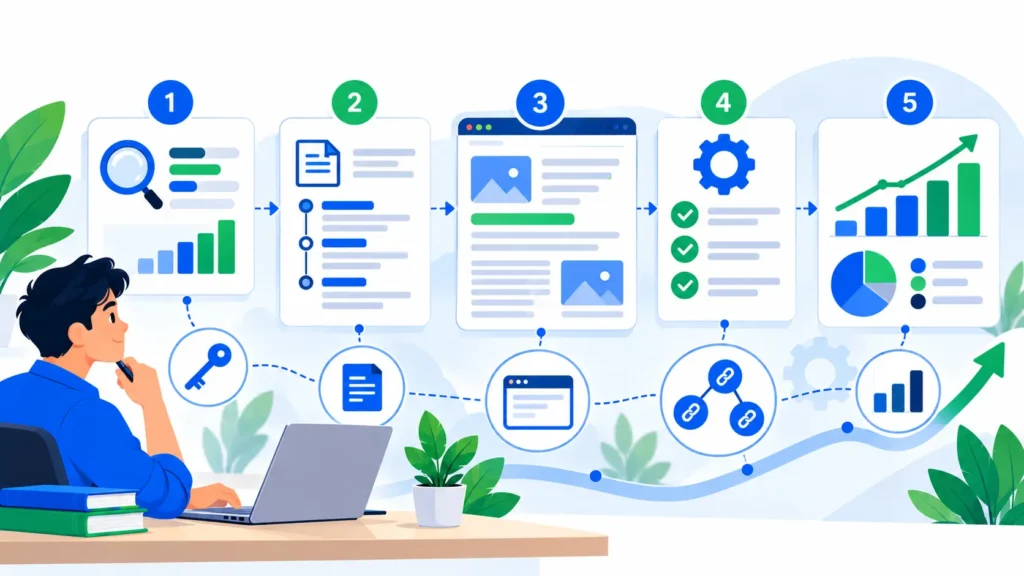
How to Learn SEO for Beginners: A Step-by-Step Guide
Search engine optimization (SEO) helps search engines understand your website and helps people discover pages that are relevant to what they are looking for. For a new blogger, freelancer, or small business owner, learning SEO can feel complicated because it includes content, website structure, technical settings, links, and performance measurement.
You do not need to learn every advanced technique at once. For SEO for beginners, it is easier to start with a small set of repeatable checks than to try every technique at the same time. The best way to begin is to understand the basics, practise them on a real website, and review what happens over time. This guide explains how to learn SEO for beginners through a clear sequence of practical tasks rather than a long list of confusing terms.
You will learn how search works, how to choose useful topics, how to improve pages, how to check whether search engines can access your site, and how to measure progress. Results are not guaranteed, and SEO usually takes time. The objective is to build a reliable process that improves the usefulness and discoverability of your website. For SEO for beginners, the best starting point is a small, repeatable routine that you can apply to a real page and review later.
What Is SEO?
SEO stands for search engine optimization. It is the practice of helping search engines discover, understand, and present useful pages to people searching for relevant information. SEO includes several connected areas. A practical SEO for beginners checklist should explain why each area matters rather than treating the terms as isolated plugin settings.
-
Content and search intent: publishing information that genuinely answers a reader’s question.
-
On-page SEO: making page titles, headings, content, internal links, and image descriptions clear.
-
Technical SEO: ensuring pages can be accessed, crawled, rendered, and indexed where appropriate.
-
Off-page signals: earning relevant attention and links through useful work and legitimate relationships.
-
Measurement: reviewing impressions, clicks, indexing, and on-site outcomes to decide what to improve.
SEO is not a one-time setting or a guarantee of a top position. Google explains that its systems crawl pages, index information, and use many signals to decide which results to show. Following recommended practices can help a site become eligible for search, but it does not guarantee that a page will be crawled, indexed, or ranked. Read Google’s official SEO Starter Guide for the foundational principles.
How SEO Works
Understanding how SEO works becomes easier when you separate the process into three stages: crawling, indexing, and serving search results. Knowing how SEO works also helps you diagnose whether a problem is about discovery, indexing, or the relevance of a page to a query.
1. Crawling
Search engines use automated systems to discover pages and follow links. A page may be discovered through an internal link, an external link, a sitemap, or other signals. If important pages are isolated, blocked, or difficult to access, search engines may struggle to find them.
2. Indexing
After a page is discovered, a search engine may process its content and decide whether to store it in its index. Indexing is not automatic for every URL. Duplicate pages, technical barriers, low-value content, or other conditions may affect whether a page is indexed.
3. Ranking and displaying results
When someone searches, the system selects and orders results it considers relevant and useful for that query. Titles, snippets, page content, links, usability, and many other signals may contribute. Search results can differ by query, context, and time, so a single ranking check does not tell the whole story.
For SEO for beginners, the key takeaway is that you cannot force a page to rank by repeating a keyword. Make the page accessible, make its purpose clear, answer the searcher’s question, and then use performance evidence to improve it.
Step 1: Set Up the Website Correctly
Before creating lots of content, make sure your website has a stable foundation. If you use WordPress, check that the site is accessible, works on mobile devices, and has a clear navigation structure. Keep the site secure with HTTPS, remove accidental maintenance or no-index settings before launch, and avoid blocking important content from crawling.
Use readable URLs that explain the topic. For example, a slug such as keyword-research-for-blog-posts is easier to understand than a random string of numbers. Do not change established URLs without a good reason; when a change is necessary, plan an appropriate redirect from the old URL to the new one.
Create useful core pages, including an About page, Contact page, privacy information, and clear descriptions of your services or publishing purpose. These pages help visitors understand who operates the site and how to get in touch. Check that navigation links work and that important pages can be reached through normal links rather than being orphaned.
If you are learning SEO on WordPress, review your theme settings, SEO plugin settings, permalink structure, and mobile layout before adding more complexity. A plugin can help manage metadata and other settings, but installing more plugins is not a substitute for making the site understandable and useful. One of the most useful SEO tips for beginners is to check important pages manually before publishing more content.
Step 2: Learn the SEO Basics for Beginners
Build a simple understanding of the terms you will see in SEO tools. The SEO basics for beginners include the purpose of a title tag, meta description, heading structure, URL, internal link, image alt text, sitemap, canonical URL, and indexability status.
Title and meta description
Write a unique, descriptive title for each important page. It should communicate the page’s topic clearly and match the visible heading. A meta description can summarise the page and help a searcher decide whether to visit, although a search engine may generate a different snippet from the page content.
Headings
Use a clear main heading and organize the sections with meaningful subheadings. Headings should help people scan the page, not exist only to place keywords. Keep the order logical and make each heading describe the content that follows.
URLs and internal links
Use concise, descriptive URLs where practical. Add internal links when another page gives the reader a useful next step. Write anchor text that describes the destination, instead of repeatedly using vague phrases such as “click here.”
Image alt text
Write alt text that describes the meaningful content of an image for people using assistive technologies and for systems trying to understand the image. Avoid filling alt text with a list of keywords. Decorative images may need empty alt attributes depending on how they are implemented.
These SEO basics for beginners are not tricks. They make content easier to navigate, understand, and maintain. A short SEO basics for beginners checklist can help you repeat these checks consistently on every important page. Google’s image SEO documentation explains how descriptive filenames and relevant alt text can help search engines understand images.
Step 3: Choose Topics and Research Keywords
Before writing an article, identify the question you want it to answer. Keyword research can reveal how people describe a problem, what variations they use, and whether they are trying to learn, compare, or buy something. Use it as evidence for topic planning, not as a reason to force exact phrases into every paragraph.
Start with the audience and topic, then gather candidate phrases from a keyword tool, search suggestions, customer questions, and competing pages. Check the likely search intent by reviewing the results that already appear for the phrase. A query that returns how-to guides usually needs a different page from a query dominated by product pages or local results.
Compare metrics such as estimated search volume and SEO difficulty where available, but interpret them carefully. Tools use estimates and different methods; low difficulty does not guarantee easy rankings, and a high-volume term may be too broad for a new site. Focus on a relevant query you can answer more usefully than the existing results.
Group closely related phrases by intent instead of creating a separate thin article for every variation. A primary phrase and supporting phrases can guide your headings and examples, but the article should still read naturally. If you want to go deeper, use PUNOVIX’s planned keyword research guide as a follow-up once it is published at https://punovix.com/keyword-research-for-blog-posts/. Add this as a clickable internal link only after Blog 2 is published and the URL works.
A practical approach to SEO for beginners is to select one main topic, note four relevant supporting phrases, inspect the search results, and prepare an outline before drafting. One of the most useful SEO tips for beginners is to check that the article actually answers the intent you observed in the search results. Record the date and location for keyword research so you know which market the estimates represent. For SEO for beginners, a modest list of relevant phrases is more useful than a large spreadsheet that never informs a content decision.
Step 4: Write Helpful, Search-Focused Content
Useful content should satisfy the reader’s goal, answer important follow-up questions, and provide enough explanation for the task. Do not simply rewrite competing articles. Add examples, original explanations, checklists, comparisons, or first-hand observations when available.
Before drafting, write a one-sentence description of the reader’s problem and the outcome the article should provide. Then create an outline that follows the reader’s likely questions. Explain essential terms, include practical steps, and use examples that fit the audience. Keep paragraphs focused and remove repeated statements that add no new information. One of the clearest SEO tips for beginners is to answer the reader’s main question early, then add context and examples where they help.
A good article usually needs a clear introduction, logical headings, a useful main body, relevant links, and a conclusion that summarises the next action. FAQs can help when they answer genuine questions that the article has not already answered in detail. They should not be added just to repeat keywords.
Google recommends creating helpful, reliable, people-first content rather than content made primarily to manipulate rankings. Its helpful content guidance offers questions for reviewing whether content is valuable, original, and trustworthy.
For a related practical approach to creating useful articles, read PUNOVIX’s content marketing guide for small businesses.
Step 5: Improve the Page with On-Page SEO
On-page SEO makes the topic and structure of an individual page clearer. Begin with the essentials: a descriptive title, one clear main heading, a natural introduction, logical subheadings, helpful body text, relevant internal links, and appropriate image descriptions.
Use your main keyword in prominent places when it fits naturally, such as the title, main heading, URL where appropriate, introduction, and a relevant subheading. Supporting phrases can appear where they accurately describe a section. There is no universal keyword density that guarantees rankings, so do not repeat a phrase simply to reach a plugin score. These SEO basics for beginners work best when they make the page clearer for readers as well as search engines.
Review the page as a reader. Is the answer easy to find? Are technical terms explained? Do links lead to relevant pages? Does the image alt text describe the actual image? Can a visitor understand the next step? These checks are more useful than adding extra keyword repetitions to a sentence that already works.
This is where practical SEO tips for beginners become part of a consistent editing process. After the first draft, review title and heading clarity, check the content against search intent, verify internal links, and make sure the page answers the question better than a bare definition would. For a dedicated implementation checklist, PUNOVIX plans a separate on-page SEO guide at https://punovix.com/on-page-seo-for-beginners/. Add this as a clickable internal link only after Blog 3 is published and the URL works.
Step 6: Learn Technical SEO Fundamentals
Technical SEO helps ensure that search engines can access and interpret important website content. Beginners do not need to master every technical issue immediately, but should know how to check some common problems.
Review whether the page returns the expected status, whether important content is blocked, whether a canonical URL is present where needed, and whether mobile users can access the same main information. Keep an XML sitemap up to date if your platform or SEO plugin generates one, and check that it includes the canonical URLs you want search engines to discover.
If a page is not appearing in search, use Google Search Console’s URL Inspection tool to review what Google knows about that URL and to test the live page. The official URL Inspection help page explains how the tool can help troubleshoot indexing and page availability. A valid indexing status does not guarantee that the page will appear for every query, but it gives you useful diagnostic information.
Do not make major sitewide changes based on one isolated warning. Identify the affected URLs, understand the cause, and make a targeted correction. After important changes, allow time for the search engine to recrawl and reprocess the page. This is another reason understanding how SEO works is useful: different problems require different checks, and not every warning needs a sitewide change.
Step 7: Build Relevant Internal and External Links
Internal links connect related pages on your own website. They help visitors discover additional information and give search engines crawlable paths between pages. Link from a section that naturally introduces the next topic, and use descriptive anchor text that reflects the destination.
For the SEO & Blogging cluster, the planned linking structure is:
-
Blog 1, this beginner guide, will link to Blog 2 on keyword research and Blog 3 on on-page SEO once those pages are published.
-
Blog 2 will link to Blog 3 and Blog 4, the SEO tips for bloggers guide.
-
Blog 3 will link to Blog 4 and Blog 5, the WordPress SEO checklist.
-
Blog 4 will link to Blog 2 and Blog 5.
-
Blog 5 will link to Blog 1 and Blog 3.
Do not activate a link to an unpublished page while it would return a 404. Add the planned links after the destination posts are live, then test them. In the meantime, link to existing, relevant published PUNOVIX articles where they genuinely help the reader. For SEO for beginners, descriptive internal links are more helpful than adding a link where it does not fit the paragraph.
For additional context about how organic search relates to other channels, readers can also explore PUNOVIX’s SEO vs social media marketing guide. The two channels can support different parts of a customer’s journey, but neither replaces useful page content.
External links should support a claim, direct readers to an official resource, or provide useful additional detail. Choose trustworthy, relevant sources and check that the URL opens. Do not add links just to meet a count, and do not assume every external link must be followed or unfollowed automatically; use the appropriate relationship attribute when the link is sponsored, user-generated, or otherwise needs special treatment. Google’s crawlable link guidance explains how descriptive anchor text and crawlable links help people and search engines understand destinations.
Step 8: Measure Results with Google Search Console
SEO needs measurement because search visibility and visitor behaviour can change over time. Google Search Console can show which queries lead to impressions and clicks, which pages receive search traffic, and whether indexing issues have been reported. Use it alongside your website analytics rather than assuming the number displayed by one plugin explains everything.
Start with a baseline. Record the pages you care about, their impressions, clicks, click-through rate, and average position over a suitable period. Compare similar date ranges and consider whether the page was newly published, recently updated, or affected by seasonal interest. Avoid making strong conclusions based on a small number of impressions.
If a page receives impressions but few clicks, inspect whether its title and description accurately communicate the value of the page. If it receives few impressions, check indexing, search intent, content coverage, and whether the query is relevant to the page. If visitors arrive but leave without taking the intended action, review content clarity and the next step offered on the page.
A simple way to understand how SEO works is to connect a change to a measurable question, such as whether the page becomes indexed or earns more relevant clicks. Search engines need time to recrawl pages, and changes may take different amounts of time to appear in results. Do not promise a fixed timeline or guaranteed position. Make changes for a clear reason, record them, and use results to guide the next review. Reviewing impressions, clicks, and indexing status helps you connect what you changed with how SEO works in practice, while remembering that a report alone may not explain every result.
A Simple 30-Day SEO Learning Plan
You can develop a solid learning routine by applying one topic each week to a real website. The schedule below is a starting point; adjust it to your time and experience.
| Period | Learning focus | Practical task |
|---|---|---|
| Week 1 | Search and website basics | Review site navigation, titles, URLs, and important pages |
| Week 2 | Keyword and topic research | Choose one relevant topic, review search intent, and outline an article |
| Week 3 | Content and on-page checks | Publish or improve a useful page and check headings, links, and image alt text |
| Week 4 | Technical checks and measurement | Review indexing in Search Console and record early performance data |
At the end of the month, review what you learned, what you changed, and what remains uncertain. The aim is to build a repeatable process, not to achieve a particular ranking within 30 days.
Common SEO Mistakes Beginners Should Avoid
Writing only for a plugin score: SEO plugins provide useful reminders, but their scores are not Google rankings. Use them as a checklist, then read the page for clarity and usefulness.
Repeating keywords unnaturally: Keyword stuffing can make content awkward and does not guarantee better visibility. Use related phrases where they help describe the subject.
Creating many near-identical pages: If several pages answer the same question in almost the same way, they may be difficult for visitors to distinguish. Group related terms by intent and create pages with a clear purpose.
Ignoring technical accessibility: Important content should be accessible to users and crawlable where it is intended to appear in search. Check indexing and site settings when pages are missing.
Changing published URLs unnecessarily: Existing URLs may already be linked to from other pages. Preserve established slugs unless there is a clear reason to change them, and use an appropriate redirect when a change is necessary.
Expecting instant results: SEO can take time. Record meaningful changes, allow for recrawling, and review performance in context instead of judging the whole effort after a few days.
Conclusion
Learning SEO is easier when you work through a clear sequence: understand search, make the website accessible, choose topics based on real questions, write helpful content, improve individual pages, check technical fundamentals, and measure performance.
Keep notes on the changes you make, use reliable sources, and evaluate results over an appropriate period. Do not chase a plugin score at the expense of readability. Good SEO work helps people find the right page and understand its value once they arrive.
Start with one page, complete the fundamentals, and then repeat the process across your website. As your knowledge grows, you can move from the basics into keyword research, detailed on-page optimization, and WordPress-specific checks without losing sight of the reader’s needs. If you are deciding how to learn SEO for beginners, choose one page this week, complete the basic checks, and record what you learn before moving to the next topic.
Frequently Asked Questions
Q1. How long does it take to learn SEO for beginners?
You can learn the fundamentals in stages, but practical skill develops through repeated work on real pages. Start with basic content and technical checks, then build knowledge as you review actual search performance. Ranking improvements are not guaranteed to happen within a fixed period.
Q2. Can I learn SEO for free?
Yes. Google’s official Search Central documentation, Search Console help, and reputable educational resources provide useful starting points. You can practise on a website you own or manage without buying every tool. Paid tools can help with research, but they do not replace sound judgment or useful content.
Q3. What are the most important SEO basics for beginners?
Understand search intent, useful content, descriptive titles, logical headings, readable URLs, internal links, image alt text, indexing, and performance measurement. Learn what each element does rather than treating the list as a scoring trick.
Q4. Is SEO difficult to learn?
The fundamentals are approachable, but SEO includes many connected areas and search systems change over time. Learn one topic at a time, practise on a real page, and check reliable documentation when a recommendation is unclear.
Q5. Do I need an SEO plugin for WordPress?
An SEO plugin can make tasks such as editing titles, meta descriptions, and sitemap settings easier, but it cannot guarantee rankings or automatically make content useful. Configure one plugin carefully and avoid overlapping plugins that create conflicting settings.
Q6. How can I check if Google has indexed my page?
Use Google Search Console’s URL Inspection tool to review the indexing status and test the live URL. An indexed page is eligible to appear in search, but indexing does not guarantee that it will rank for a specific query.
Q7. Should I use the exact keyword in every heading?
No. Use the main phrase where it accurately describes the page and section, then write headings that help readers navigate the content. Repeating exact keywords in every heading can make the article awkward and unnecessary.
Related SEO & Blogging Articles

WordPress SEO Checklist: 12 Steps to Improve Search Visibility
PUNOVIX Blog A WordPress website needs more than well-written articles to perform well in search. Search engines must

SEO Tips for Bloggers: 9 Practical Ways to Improve Blog Posts
PUNOVIX Blog Publishing a blog post is only one part of building a useful website. Readers need to
On-Page SEO for Beginners: A Practical Checklist
PUNOVIX Blog On-page SEO helps search engines understand what a page is about and helps visitors find, read,